
The stronger input for estimating a CNC machined component is usually a valid STEP file that imports as one closed B-rep solid. STEP can also carry other representations, assemblies and product information, so the extension alone does not guarantee that content. STL stores a triangular surface representation; either format’s usefulness depends on the export, importer and data quality.
Review scope: this article passed an internal Kostira source audit covering CAD exchange standards and current product limitations. It is not an externally signed manufacturing engineer’s opinion or certification of interoperability for a particular CAD/CAM system; validate the file through the export–import chain you use.
What STEP contains
STEP belongs to the ISO 10303 family for product-data exchange. A common, valid solid-part export can retain boundary-representation geometry: faces, edges, curves and relationships that make up a model. That gives an importer a stronger basis for analysis than triangulation alone, provided the file actually imports as a valid solid.
Not every STEP file contains B-rep geometry or a complete manufacturing definition. ISO 10303-242 (AP242) covers, among other things, multiple geometry representations, assembly structures and product and manufacturing information (PMI), but a particular file contains only what the source system exported. Semantic or graphic PMI may exist in AP242, yet its presence and correct mapping must be verified in the export, importer and target application. Tolerances, finish, material and quality requirements may still exist only on the drawing or in the RFQ notes.
What STL contains
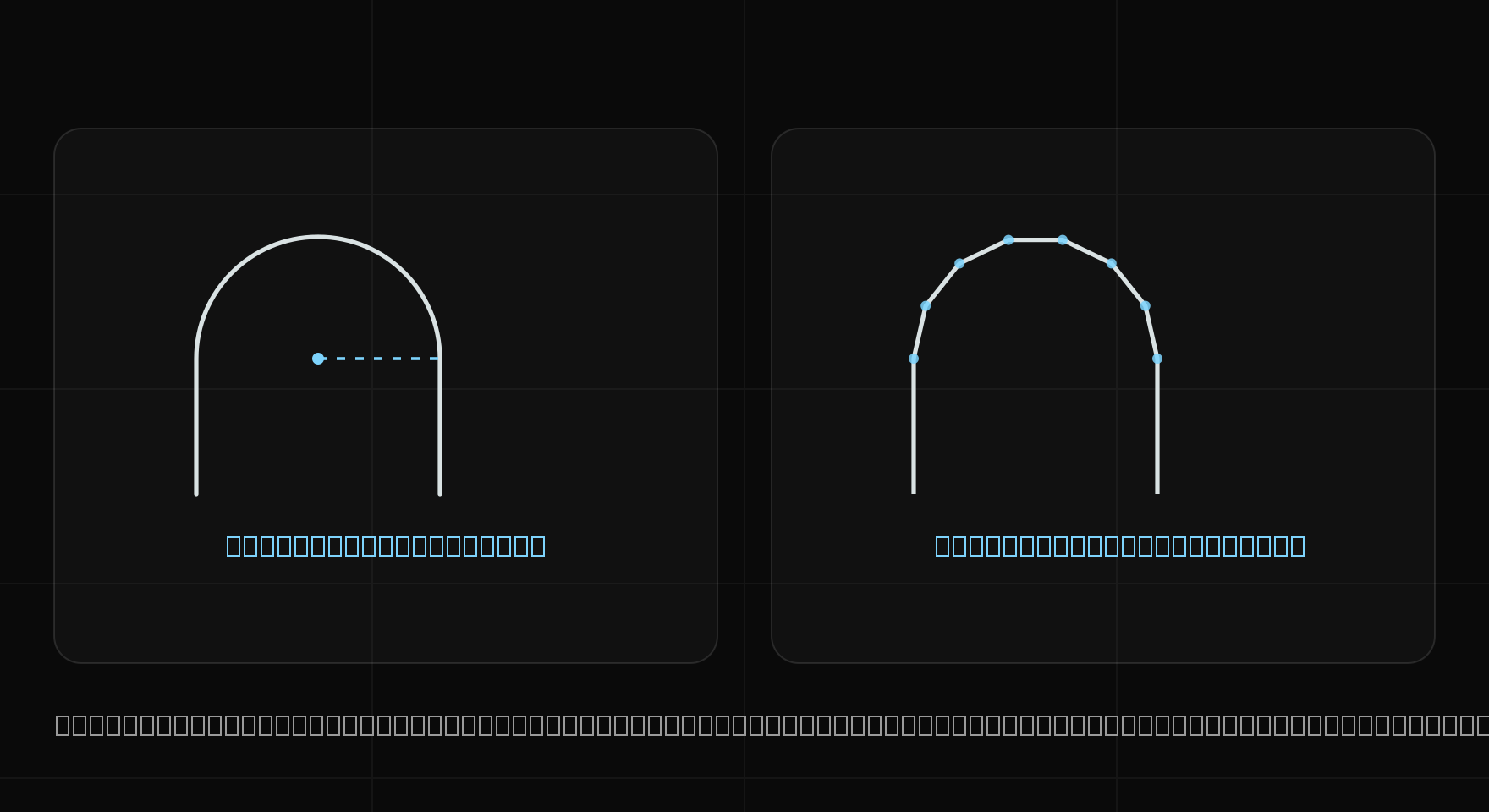
STL describes a surface as a set of triangles. Its fidelity depends on tessellation settings: a coarse mesh distorts curves and small features, while a dense mesh increases facet count without restoring the original CAD geometry. STL is not necessarily lightweight; file size and processing cost depend on facet count and whether the encoding is binary or text.
STL does not define an unambiguous length unit. Millimetres or inches must come from an agreement or from the importing system, which adds risk when dimensions are calculated automatically.
Differences that affect estimating
| Area | STEP | STL |
|---|---|---|
| Representation | may contain B-rep, surfaces, tessellation or assembly structure depending on profile and export | triangular surface representation |
| Cylinders and curves | a valid B-rep can retain analytical geometry or NURBS when export and import support them | facet approximation |
| Volume | reliable only for a valid closed solid imported with confirmed units | requires a watertight, consistently oriented closed mesh and known scale |
| Units | the exchange schema can carry units, but the imported result still needs verification | classic STL does not define them unambiguously; the importer or an agreement supplies them |
| PMI and manufacturing data | AP242 can encode them when exported and supported on import | not a complete manufacturing-definition representation |
| Feature analysis | a valid B-rep can provide a stronger basis for recognising geometry | requires inference or reconstruction from facets |
| Rendering | normally requires a renderable representation, commonly tessellation | can be rendered as a mesh, but performance depends on facet count |
| File size | depends on content, complexity and encoding | depends on tessellation density and binary or ASCII encoding; not always smaller |
When STL is still useful
STL can be practical for exchange with a mesh-based workflow such as additive manufacturing, or for viewing after choosing a reasonable tessellation density. It may be enough for a rough bounding-box check when scale, tessellation and mesh condition are known.
A mesh that looks correct is not necessarily production-ready. Holes, inverted normals and overlapping triangles can prevent reliable mass or volume calculation.
How Kostira uses the formats
Kostira accepts .stp and .step files up to 50 MB. The current import scope is a part file that can be imported as a single solid. Volume is useful only when the importer receives a valid closed solid with correct units. The interactive preview can use a generated mesh, but the imported STEP model remains the source input.
Kostira does not currently promise estimating for assemblies, multi-body files, or inputs containing only PMI, tessellation or surfaces without an importable solid. If a STEP file contains those forms, first export a supported single part as a valid solid.
With either format, the estimator should confirm scale, material, tolerances, quantity and operations. A better file improves the input; it does not make the manufacturing decision.
Sources and related guides
- ISO 10303-242:2025 — the current AP242 scope, including multiple geometry representations, product structures and manufacturing information.
- NIST: STEP File Analyzer and Viewer — primary documentation for analysing AP242/AP203/AP214, PMI, validation properties and basic STEP errors.
- Autodesk: STL import options — importer documentation confirming a triangle mesh and the need to set the STL unit.
- SOLIDWORKS: STEP files — an example of STEP content depending on the chosen variant, export and import.
- SOLIDWORKS: exporting PMI to STEP AP242 — documentation showing that PMI requires the appropriate variant and an explicit export path.
- How to quote CNC parts step by step